
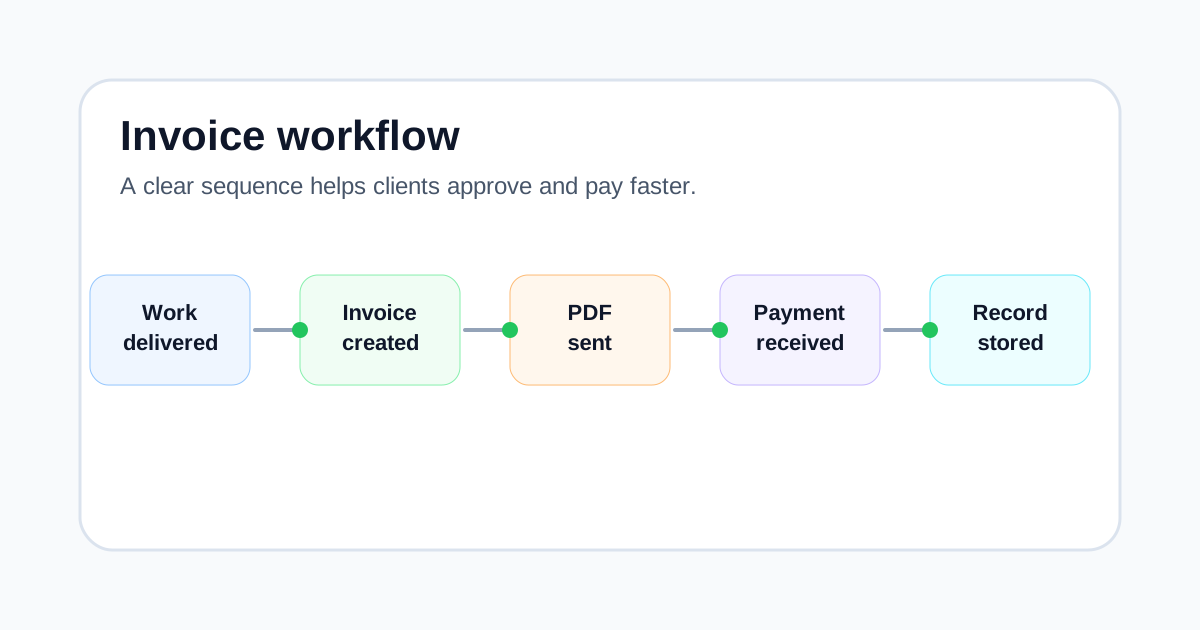
If you’ve ever had to send a second email that starts with, "Just following up on my invoice…", you already know the uncomfortable truth: payment is rarely delayed because you did bad work. It’s delayed because something in the billing process created friction.
In 2026, that friction shows up in very practical ways. A client might route your invoice to an accounts payable team you’ve never met. It might be scanned by software that tries to match it to a purchase order. It might be reviewed by a bookkeeper who manages ten vendors and has no time to guess what "Project support" means. When the invoice details are incomplete or the invoice layout hides the important information, your invoice becomes a question mark—and question marks don’t get paid quickly.
Here’s the good news: creating a professional invoice is not about fancy design, complicated language, or trying to look like a large corporation. A professional invoice is simply an invoice that is clear, consistent, and easy to approve. It answers the client’s questions before they have to ask. It shows exactly what was delivered, how much it costs, when it’s due, and how to pay.
I’ve worked with freelancers, consultants, tradespeople, and small service businesses for over a decade. The pattern is always the same: when you tighten up your invoice format and you get disciplined about the basics, you spend less time chasing payments—and you reduce the chance of disputes.
In this guide, I’ll show you how to write an invoice that looks professional in 2026 and works with real-world payment systems. You’ll get a step-by-step process, a practical invoice example, and a checklist you can reuse. I’ll also point out the most common invoice mistakes that quietly delay payments. As a practical option, Quick Invoice Tool can help you assemble a clean invoice quickly, but the real advantage comes from knowing what to include and why.
What a “Professional Invoice” Means in 2026
A professional invoice does three jobs at the same time:
- It makes the transaction easy to understand (who, what, when, how much).
- It makes it easy for the client to process payment without follow-up questions.
- It creates a tidy record for both sides (bookkeeping, tax, and proof of what was agreed).
When people talk about a "professional invoice", they often focus on visuals—logo placement, colors, and fonts. Those can help, but they’re not the main reason invoices get approved quickly. Approval happens when the invoice is easy to match to a project, contract, or purchase order, and when the numbers and payment terms are unambiguous.
In other words, a professional invoice is one that a stranger could process. That’s a useful standard in 2026 because a stranger often does process it.
The hidden audience: your client’s finance workflow
Your day-to-day contact might be a founder, marketing manager, or operations lead. But once you email an invoice, it often goes to a different world:
- Shared inboxes (accounts@, billing@)
- Finance teams working in batches
- Outsourced bookkeepers who only see the invoice
- Approval chains (project manager → department head → finance)
Your invoice layout and invoice details have to work for that world.
The Essential Invoice Details (Don’t Skip These)
If you want to avoid payment delays, focus first on the invoice details that remove uncertainty. These are the elements that should appear on every invoice, regardless of industry.
1) Your business information
Include:
- Your business name (or your full legal name if you trade personally)
- Business address (or at least city/country if you operate remotely)
- A contact email
- Tax registration number (VAT/GST/sales tax ID), if applicable
- Company registration number, if you have one
Why it matters: finance teams need to identify the supplier correctly, and some clients require official business information before they can pay.
2) Client information
Include:
- Client’s legal business name
- Billing address
- Optional: "Attn" line for Accounts Payable or a specific person
Why it matters: large organizations often have multiple legal entities. If you invoice the wrong one, payment can stall until the paperwork is corrected.
3) Invoice identification
Include:
- Invoice number (unique)
- Invoice date (issue date)
- Due date (a specific date is best)
- Purchase order number or project reference (if the client uses them)
Why it matters: this is how your invoice gets tracked internally. Missing identifiers are one of the top reasons invoices get rejected or parked.
4) Clear line items
Each line item should have:
- Description (specific, not vague)
- Quantity and unit (hours, days, fixed fee, items)
- Rate
- Line total
Why it matters: vague lines trigger questions, and questions slow payment.
5) Totals and tax
Include:
- Subtotal
- Discounts (if any)
- Tax rate and amount (if applicable)
- Total due
Why it matters: clients need a clean breakdown for bookkeeping and tax reporting.
6) Payment instructions
Include:
- Who to pay (payee name)
- Payment method(s)
- Bank details or payment link where relevant
- Payment reference to include (often the invoice number)
Why it matters: a surprising number of delays happen because the client can’t pay without asking you for details.
Invoice Format: A Simple Structure That Works
A good invoice format is predictable. It tells the reader where to look for the information they need. Here’s a structure that works well for most freelancers and small businesses:
- Header: your name/business + the word "Invoice"
- Summary panel: invoice number, invoice date, due date, total due
- Bill To: client details
- Line items: a table of services/products
- Totals: subtotal, tax, total
- Payment details
- Notes/terms
Invoice layout tips (practical, not decorative)
- Make the total and due date easy to spot.
- Align numbers so they are easy to scan.
- Use consistent labels: "Invoice Number", "Due Date", "Total Due".
- Leave enough spacing—crowded invoices feel messy.
- Keep it print-friendly. Some finance teams still print invoices for approval.
Step-by-Step: How to Write an Invoice That Gets Paid
This is the process I recommend when someone asks me how to write an invoice that feels professional and reduces payment delays.
Step 1: Confirm the billing contact and any required references
Before you draft the invoice, confirm two things:
- Where invoices should be sent (a billing email or portal)
- Whether a PO number, vendor ID, or project code is required
If you’re working with a larger client, ask this before you start the job. It’s much easier than chasing it later.
Real-life scenario: A freelance developer finishes a small feature for a mid-size company and invoices the project manager directly. The project manager forwards it to finance, and finance replies: "We can’t process invoices without a PO number." Three days are lost while everyone looks for the PO. The invoice was correct, but it couldn’t enter their system.
Step 2: Choose a clean invoice numbering system
Your invoice numbering needs to be simple and consistent. It’s not just admin—invoice numbers help you track payments, match bank transfers, and keep tidy records.
Two common formats that work well:
- 2026-001, 2026-002, 2026-003 (reset each year)
- INV-2026-0001, INV-2026-0002 (more formal)
Rules:
- Never reuse an invoice number.
- Keep the sequence predictable.
- Don’t embed too many changing details.
If you want to go deeper on this, "Invoice Numbering Explained for Small Businesses" is the related topic most owners find useful.
Step 3: Add invoice date and due date (be specific)
In 2026, you should almost always include an actual due date, not just "Net 30". Use both if you like:
- Invoice date: 11 Jan 2026
- Payment terms: Net 14
- Due date: 25 Jan 2026
Why it matters: it avoids misunderstandings like "Is it 14 days from receipt or from issue?"
Step 4: Write line items that match real work
This is the heart of your invoice. Your goal is to make the work recognizable and billable without a phone call.
Avoid vague descriptions like:
- "Consulting"
- "Design work"
- "Monthly services"
Use descriptions that a finance team can match to a project:
- "Discovery workshop (2 hours) — requirements + action plan"
- "Landing page design — wireframes + final UI (fixed fee)"
- "Maintenance retainer — Jan 2026 (includes up to 4 hours)"
If you bill hourly, include the date range and a short summary of the tasks. If you bill fixed fee, name the deliverable clearly and reference the proposal or contract if relevant.
Step 5: Check the math and present totals clearly
This sounds obvious, but incorrect totals are still one of the most common invoice mistakes. Even when the client trusts you, finance teams may reject an invoice that doesn’t add up perfectly.
Do a quick check:
- Quantity × rate equals each line total
- Subtotal equals the sum of all lines
- Tax is applied correctly
- Total due is correct
If you charge VAT/GST/sales tax, show it as a separate line with the rate and amount. If you don’t charge tax, it can still help to show "Tax: 0.00" so the client’s bookkeeper doesn’t wonder whether it was missed.
Step 6: Add payment terms that fit the client
Payment terms are part of your invoice details, but they’re also a relationship decision. A solo freelancer billing a local client may be comfortable with "Due on receipt". A consultant billing a corporate client might need "Net 30" simply because that’s how the organization pays.
Common terms:
- Due on receipt
- Net 7
- Net 14
- Net 30
A practical way to think about it:
- New client + small job: tighter terms are reasonable
- Large client + formal finance process: expect longer terms, but be clear
For a detailed breakdown of the pros and cons, "Best Invoice Payment Terms for Freelancers (Net 7, Net 15, Net 30)" is the related topic most people ask about next.
Step 7: Make payment instructions unmissable
If a client has to email you for bank details, you’ve added days to the timeline. Keep payment instructions clear and complete.
Include:
- Payee name
- Bank name
- Account number / IBAN
- SWIFT/BIC for international transfers
- Any payment reference needed
If you accept card or online payments, add that method too. The easier you make payment, the less likely the invoice sits in limbo.
Step 8: Send the invoice in the right format and to the right place
A PDF is still the safest standard for invoices in 2026. It keeps the invoice layout consistent and avoids accidental edits.
Also, pay attention to where you send it:
- Send to the billing inbox if the client has one
- If the client uses a portal, follow their process
- Use a clear subject line: "Invoice INV-2026-0007 — Due 25 Jan 2026"
A Practical Invoice Example (Simple and Professional)
Here’s a straightforward invoice example you can copy for your own invoice format. It’s intentionally plain because clarity is the priority.
Invoice Example
INVOICE
Supplier: Bright Corner Studio Email: billing@brightcorner.example Address: London, UK
Bill To: Northbridge Marketing Ltd Billing address: 14 Example Street, Manchester, UK Attn: Accounts Payable
Invoice Number: INV-2026-0007 Invoice Date: 11 Jan 2026 Due Date: 25 Jan 2026 Reference: PO-48192 / Project: Q1 Landing Page
Line items:
- Landing page redesign (wireframes + final UI) — 1 × £1,200.00 = £1,200.00
- Copy edit support (Jan 8–10, 2026) — 3 hours × £90.00 = £270.00
Subtotal: £1,470.00 VAT (0%): £0.00 Total Due: £1,470.00
Payment instructions: Bank transfer to Bright Corner Studio IBAN: GB00 XXXX 0000 0000 0000 00 Reference: INV-2026-0007
Notes: Thank you for your business.
Common Mistakes That Delay Payment (and How to Avoid Them)
A lot of late payments start with small invoice errors. They don’t look dramatic when you hit send, but they create friction for the client.
Mistake 1: Missing or unclear due date
"Due upon receipt" is not always enough, especially with bigger clients. Add a specific due date to remove ambiguity.
Mistake 2: Vague line items
If your invoice description is too broad, your client may ask for clarification, or finance may hold it until someone confirms it’s valid. Write line items so they can be approved without your help.
Mistake 3: Incorrect client entity details
Billing the wrong entity name is common when a group has multiple subsidiaries. Ask for the legal billing name once and store it.
Mistake 4: Inconsistent invoice numbering
Skipping numbers, reusing numbers, or switching formats makes your records harder to manage and can look careless to finance teams.
Mistake 5: Missing payment instructions
If you accept bank transfer, include all the details. If you accept multiple payment methods, list them clearly.
Mistake 6: Forgetting reference numbers (PO, vendor ID, project code)
Some clients will not pay an invoice without these. If you don’t know what to include, ask the billing contact before the first invoice goes out.
If this topic feels familiar, "Common Invoice Mistakes That Delay Payments" is worth reading next—small fixes can make a big difference to cash flow.
Practical Checklists You Can Reuse
Before you send an invoice
- Confirm billing email or portal
- Confirm required references (PO, vendor ID)
- Verify client legal name and billing address
- Confirm currency and payment method
Invoice checklist (the essentials)
- Your business name + contact details
- Client legal name + billing address
- Invoice number
- Invoice date
- Due date
- Clear line items with quantities and rates
- Subtotal, tax (if applicable), total due
- Payment instructions
After you send the invoice
- Save a copy of the PDF
- Note the due date in your calendar
- If it’s a new client, confirm they received it
Where the Invoice Generator and Quotation Generator Fit
If you invoice occasionally, you can build your own template in a document or spreadsheet. But if you invoice regularly, the bigger risk is inconsistency: one invoice has a due date, the next doesn’t; one has the right layout, the next has missing invoice details.
That’s where a browser-based invoice generator is useful. It nudges you to include the core fields every time and produces a clean, consistent invoice format. Similarly, a quotation generator helps you send a clear quote before work begins, which reduces billing disagreements later because the invoice can match the quotation structure and pricing.
For example, tools like Quick Invoice Tool allow you to enter client details, line items, and payment terms, then download a neat invoice PDF. The goal isn’t fancy features—it’s reducing the small errors that cause delays.
FAQ
What information is required on a professional invoice?
At minimum: your business details, client details, a unique invoice number, invoice date, due date or payment terms, line items, totals, and payment instructions. Tax details depend on your location and registration.
What’s the best invoice layout for fast payment?
Use a layout where the invoice number, due date, and total due are obvious at a glance. Finance teams should not have to hunt for them.
Should I use “Due on receipt” or Net 30?
Use terms that match the client and the job. "Due on receipt" can work for small, one-off jobs and new clients. Net 30 is common for larger organizations. Whichever you choose, include a specific due date.
How detailed should invoice line items be?
Detailed enough that a finance person can match them to the project without asking you. Include the deliverable or service, the date range, and the quantity (hours/days/fixed fee).
Can I charge late fees on an invoice?
Often yes, but you should state late fee terms upfront and make sure they’re permitted in your jurisdiction and contract. If you don’t plan to enforce late fees, it’s usually better not to include them.
What’s the best way to send an invoice in 2026?
PDF is still the safest default. Send it to the correct billing contact or upload it through the client’s portal. Use a clear subject line and keep a copy for your records.
What if a client disputes an invoice?
Ask what specifically they disagree with (rate, scope, dates, tax). Refer back to the quotation, contract, or written approval. If you made an error, correct it quickly and document the change.
Do I need to keep copies of invoices?
Yes. Keep invoices for bookkeeping, tax, and proof of payment history. Retention rules vary by country, but keeping organized records protects you either way.
Conclusion
A professional invoice in 2026 is less about looking impressive and more about being easy to process. When your invoice format is consistent, your invoice details are complete, and your invoice layout highlights the total and due date, you reduce delays and make payment routine.
Use clear line items, keep numbering tidy, include the right references, and make payment instructions obvious. Those basics do more for cash flow than any clever wording ever will.
If you want a simple way to create professional invoices, Quick Invoice Tool makes it easy to do that in minutes.